
|
|


Пишет AnandTech (![[info]](http://lj.rossia.org/img/syndicated.gif) syn_anandtech) syn_anandtech)@ 2020-09-30 08:01:00 |
 |
|
 |
|
|
|
|
|
|
 |
|
 |


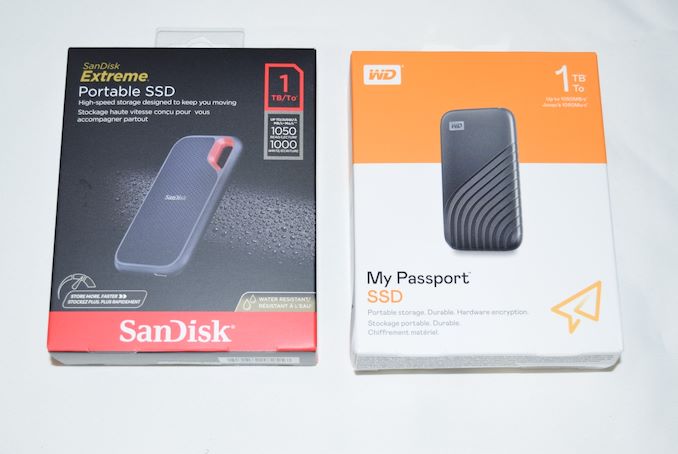
External bus-powered storage devices have grown both in storage capacity as well as speeds over the last decade. Thanks to rapid advancements in flash technology (including the advent of 3D NAND and NVMe) as well as faster host interfaces (such as Thunderbolt 3 and USB 3.x), we now have palm-sized flash-based storage devices capable of delivering 2GBps+ speeds. While those speeds can be achieved with Thunderbolt 3, mass-market devices have to rely on USB. This review discusses the performance and characteristics of Western Digital's latest offerings (2020 catalog) supporting USB 3.1 Gen 2 (10 Gbps) speeds.
Introduction
High-performance external storage devices use either Thunderbolt 3 or USB 3.2 Gen 2 for the host interface. Traditional SATA SSDs (saturating at 560 MBps) can hardly take full advantage of the bandwidth offered by USB 3.2 Gen 2. In 2020, we have seen the market move en-masse to NVMe SSDs behind a USB 3.2 Gen 2 bridge for this market segment.
Western Digital brought NVMe support to their My Passport SSD product line last month. Today, the company is launching the SanDisk Extreme Portable SSD v2 (along with the Extreme PRO Portable SSD v2). The Extreme v2 is of particular interest here, as both the feature set and the performance specifications tally with that of the My Passport SSD. The company provided us with review samples of the 1TB versions of the My Passport SSD as well as the SanDisk Extreme Portable SSD v2.
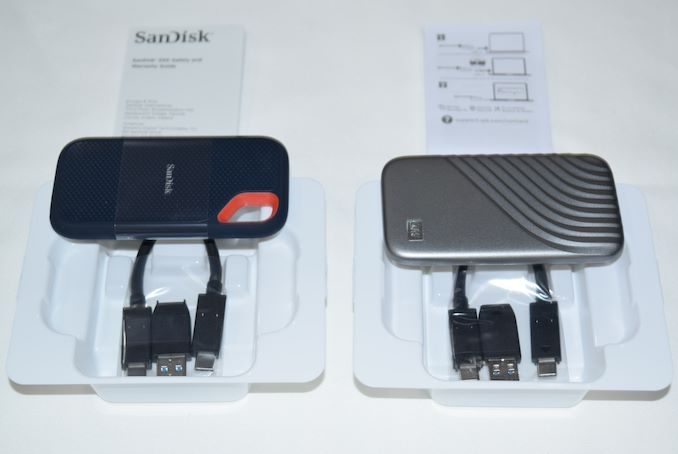
The two products are packaged similarly and both come with short (15cm) USB 3.2 Gen 2 Type-C to Type-C cables. A Type-C to Type-A adaptor is supplied, similar to the ones with the previous generation external SSDs from Western Digital. The industrial design of the units is quite different, each appealing to its own target market. The carabiner loop in the SanDisk Extreme / PRO line has proved to be a useful complement to the gumstick form-factor enforced by the usage of a M.2 NVMe SSD. It has been particularly appreciated by content creators (photographers and videographers) on the go. The My Passport SSD with its rounded edges and grooves / availability in multiple colors may hold appeal to the mainstream style-conscious audience. As we shall see further down in the 'Device Features & Characteristics' section, the internal hardware is identical. The rest of the review also tackles another interesting aspect - does the same internal hardware lead to similar performance profiles for the two SSDs?
In this review, we compare the SanDisk Extreme Portable SSD v2 and the WD My Passport SSD (2020) against each other, as well as the following DAS units that we have reviewed before.
- ADATA SE800 1TB
- Crucial Portable SSD X8 1TB
- HP P700 1TB
- Lexar SL100 Pro 1TB
- Patriot PXD 1TB
- Samsung Portable SSD T7 Touch 1TB
- SanDisk Extreme Pro Portable SSD 1TB
A quick overview of the internal capabilities of the storage devices is given by CrystalDiskInfo.
| Drive Information |
| <select ... ><option ... >SanDisk Extreme Portable SSD v2 1TB</option><option ... >WD My Passport SSD (2020) 1TB</option><option ... >ADATA SE800 1TB</option><option ... >Crucial Portable SSD X8 1TB</option><option ... >HP P700 1TB</option><option ... >Lexar SL100 Pro 1TB</option><option ... >Patriot PXD 1TB</option><option ... >Samsung Portable SSD T7 Touch 1TB</option><option ... >SanDisk Extreme Pro Portable SSD 1TB</option><option ... >Expand All</option> </select> |
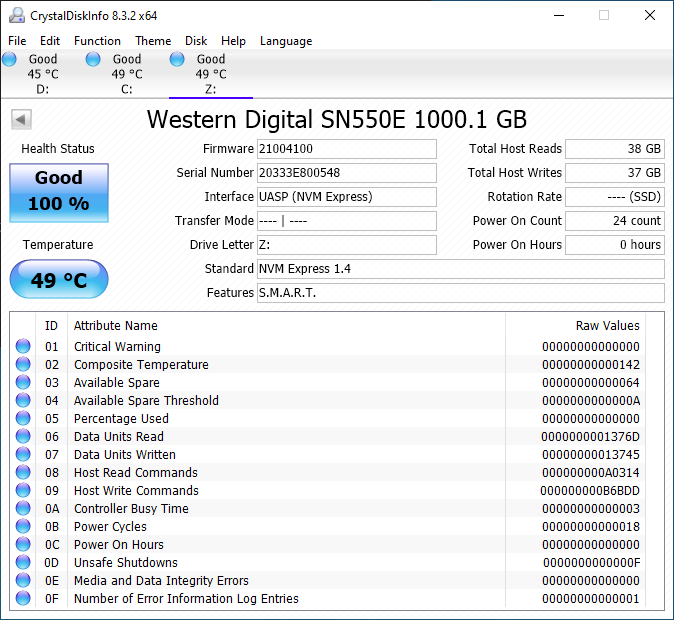 |
The SanDisk Extreme Portable SSD v2 and the WD My Passport SSD (2020) use the same internal SSD - the Western Digital SN550E. The SN550 is available in retail under the WD Blue branding. We believe that the 'E' suffix stands for 'External' - WD did confirm that the SSD being used was SN550-class, and it contained specific firmware tweaks for use as an external SSD. Like almost every other M.2 NVMe SSD behind a USB 3.2 Gen 2 bridge, the SanDisk Extreme Portable SSD v2 and the WD My Passport SSD (2020) support S.M.A.R.T. passthrough and TRIM (though it is not explicitly evident in the CrystalDiskInfo screenshot).


The gallery above presents some pictures of the internals of the WD My Passport SSD (2020). We see that the two sides of the My Passport SSD clamshell are held together by industrial-strength double sided tape. Prying apart the two at the seam was relatively painless - in fact, it was the easiest portable SSD to take apart (out of all the ones that I had worked on earlier). The SanDisk Extreme Portable SSD v2's top segment holds on to the bottom segment using a series of plastic clips in the inside perimeter - this is straightforward to take out using opening picks. Selected pictures are available in the gallery below.


Inside the unit, we see that a thermal pad right across the M.2 SSD (in the Extreme v2 teardown) and another on the reverse side (in the My Passport SSD teardown). In addition to helping remove the heat away, they also ensure that the boards are snug inside the enclosure and can withstand shocks and vibrations. Pictures of the ASMedia ASM2362 bridge chip can be seen in the main board, while the SanDisk 20-82-10023 controller can be seen in the M.2 SSD.
Testbed Setup and Testing Methodology
Evaluation of DAS units on Windows is done with a Hades Canyon NUC configured as outlined below. We use one of the rear USB Type-C ports enabled by the Alpine Ridge controller for both Thunderbolt 3 and USB devices.
| AnandTech DAS Testbed Configuration | |
| Motherboard | Intel NUC8i7HVB |
| CPU | Intel Core i7-8809G Kaby Lake, 4C/8T, 3.1GHz (up to 4.2GHz), 14nm+, 8MB L2 |
| Memory | Crucial Technology Ballistix DDR4-2400 SODIMM 2 x 16GB @ 16-16-16-39 |
| OS Drive | Intel Optane SSD 800p SSDPEK1W120GA (118 GB; M.2 Type 2280 PCIe 3.0 x2 NVMe; Optane) |
| SATA Devices | Intel SSD 545s SSDSCKKW512G8 (512 GB; M.2 Type 2280 SATA III; Intel 64L 3D TLC) |
| Chassis | Hades Canyon NUC |
| PSU | Lite-On 230W External Power Brick |
| OS | Windows 10 Enterprise x64 (v1909) |
| Thanks to Intel for the build components | |
Our evaluation methodology for direct-attached storage devices adopts a judicious mix of synthetic and real-world workloads. While most DAS units targeting a particular market segment advertise similar performance numbers and also meet them for common workloads, the real differentiation is brought out on the technical side by the performance consistency metric and the effectiveness of the thermal solution. Industrial design and value-added features may also be important for certain users. The remaining sections in this review tackle all of these aspects after analyzing the features of the drives in detail.
Device Features and Characteristics
Prior to looking at the usage characteristics of the SanDisk Extreme Portable SSD v2 and the WD My Passport SSD (2020), it is helpful to compare their specifications against other similar SSDs.
| Direct-Attached Storage Characteristics | ||
| Aspect | <select ... ><option ... >SanDisk Extreme Portable SSD v2 1TB</option><option ... >WD My Passport SSD (2020) 1TB</option><option ... >ADATA SE800 1TB</option><option ... >Crucial Portable SSD X8 1TB</option><option ... >HP P700 1TB</option><option ... >Lexar SL100 Pro 1TB</option><option ... >Patriot PXD 1TB</option><option ... >Samsung Portable SSD T7 Touch 1TB</option><option ... >SanDisk Extreme Pro Portable SSD 1TB</option> </select> | <select ... ><option ... >WD My Passport SSD (2020) 1TB</option><option ... >ADATA SE800 1TB</option><option ... >Crucial Portable SSD X8 1TB</option><option ... >HP P700 1TB</option><option ... >Lexar SL100 Pro 1TB</option><option ... >Patriot PXD 1TB</option><option ... >Samsung Portable SSD T7 Touch 1TB</option><option ... >SanDisk Extreme Pro Portable SSD 1TB</option><option ... >SanDisk Extreme Portable SSD v2 1TB</option> </select> |
| Upstream Port | USB 3.2 Gen 2 Type-C | USB 3.2 Gen 2 Type-C |
| Bridge / Controller | ASMedia ASM2362 + SanDisk 20-82-10023 | ASMedia ASM2362 + SanDisk 20-82-10023 |
| Flash | SanDisk BiCS 4 96L 3D TLC | SanDisk BiCS 4 96L 3D TLC |
| Power | Bus Powered | Bus Powered |
| Physical Dimensions | 52.42 mm x 100.54 mm x 8.95 mm | 55 mm x 100 mm x 9 mm |
| IP Rating | IP55 | N/A |
| Weight | 63 grams (without cable) | 54 grams (without cable) |
| Cable | 15 cm USB 3.2 Gen 2 Type-C to Type-C Type-C to Type-A Adaptor |
15 cm USB 3.2 Gen 2 Type-C to Type-C Type-C to Type-A Adaptor |
| S.M.A.R.T Passthrough | Yes | Yes |
| UASP Support | Yes | Yes |
| TRIM Passthrough | Yes | Yes |
| Encryption Support | Hardware (SanDisk SecureAccess App) | Hardware (WD Security App) |
The two SSDs have the shortest supplied cable lengths at 15cm. Tower desktop users with USB-C ports in the rear panel may need to keep this in mind. The drives feel solid in hand, thanks to their 50g+ weight. The WD My Passport SSD (2020) is slightly wider than the SanDisk Extreme v2, but both of them fit easily in pockets for carrying around.
Synthetic Benchmarks - ATTO and CrystalDiskMark
SanDisk claims speeds of up to 1050 MBps for the two SSDs, and these are almost backed up by the ATTO benchmarks provided below. Unfortunately, these access traces are not very common in real-life scenarios.
| Drive Performance Benchmarks - ATTO |
| <select ... ><option ... >SanDisk Extreme Portable SSD v2 1TB</option><option ... >WD My Passport SSD (2020) 1TB</option><option ... >ADATA SE800 1TB</option><option ... >Crucial Portable SSD X8 1TB</option><option ... >HP P700 1TB</option><option ... >Lexar SL100 Pro 1TB</option><option ... >Patriot PXD 1TB</option><option ... >Samsung Portable SSD T7 Touch 1TB</option><option ... >SanDisk Extreme Pro Portable SSD 1TB</option><option ... >Expand All</option> </select> |
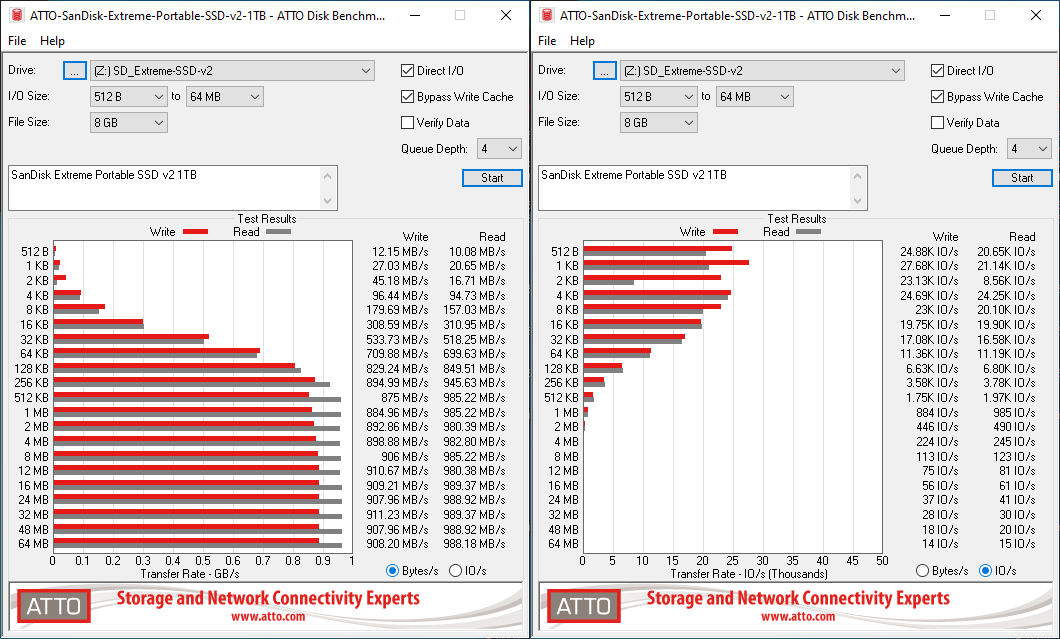 |
Speeds top out at 989 MBps reads and around 912 MBps writes for the two SSDs. An interesting point to note here is that the SanDisk Extreme Pro Portable SSD from last year had similar read numbers, but the writes went up to 929 MBps.
CrystalDiskMark, despite being a canned benchmark, provides a better estimate of the performance range with a selected set of numbers.
| Drive Performance Benchmarks - CrystalDiskMark |
| <select ... ><option ... >SanDisk Extreme Portable SSD v2 1TB</option><option ... >WD My Passport SSD (2020) 1TB</option><option ... >ADATA SE800 1TB</option><option ... >Crucial Portable SSD X8 1TB</option><option ... >HP P700 1TB</option><option ... >Lexar SL100 Pro 1TB</option><option ... >Patriot PXD 1TB</option><option ... >Samsung Portable SSD T7 Touch 1TB</option><option ... >SanDisk Extreme Pro Portable SSD 1TB</option><option ... >Expand All</option> </select> |
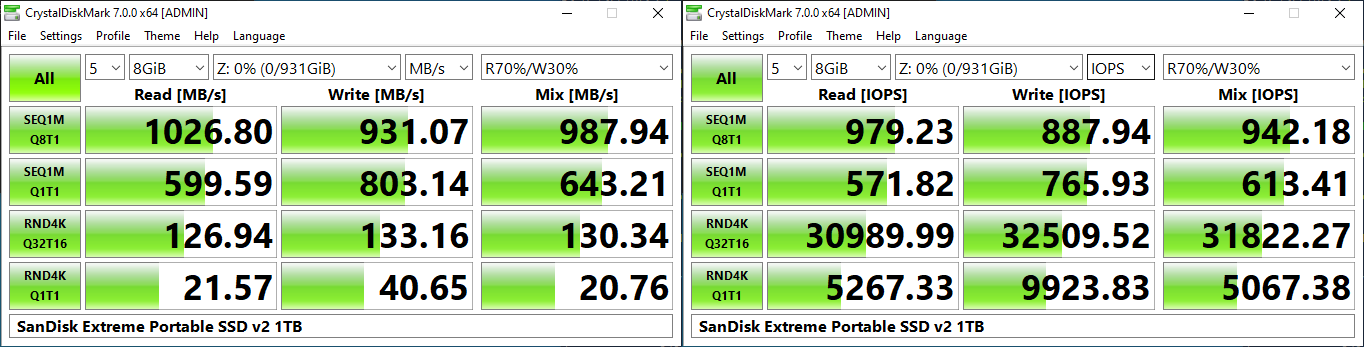 |
As evident from the screenshot above, the performance can dip to as low as 21 MBps for 4K random reads.
AnandTech DAS Suite - Benchmarking for Performance Consistency
Our testing methodology for DAS units takes into consideration the usual use-case for such devices. The most common usage scenario is transfer of large amounts of photos and videos to and from the unit. Other usage scenarios include the use of the DAS as a download or install location for games and importing files directly off the DAS into a multimedia editing program such as Adobe Photoshop. Some users may even opt to boot an OS off an external storage device.
The AnandTech DAS Suite tackles the first use-case. The evaluation involves processing three different workloads:
- Photos: 15.6 GB collection of 4320 photos (RAW as well as JPEGs) in 61 sub-folders
- Videos: 16.1 GB collection of 244 videos (MP4 as well as MOVs) in 6 sub-folders
- BR: 10.7 GB Blu-ray folder structure of the IDT Benchmark Blu-ray
Each workload's data set is first placed in a 25GB RAM drive, and a robocopy command is issued to transfer it to the DAS under test (formatted in NTFS). Upon completion of the transfer (write test), the contents from the DAS are read back into the RAM drive (read test). This process is repeated three times for each workload. Read and write speeds, as well as the time taken to complete each pass are recorded. Bandwidth for each data set is computed as the average of all three passes.
<select ... ><option ... >Blu-ray Folder Read</option><option ... >Blu-ray Folder Write</option><option ... >Photos Read</option><option ... >Photos Write</option><option ... >Videos Read</option><option ... >Videos Write</option><option ... >Expand All</option> </select>
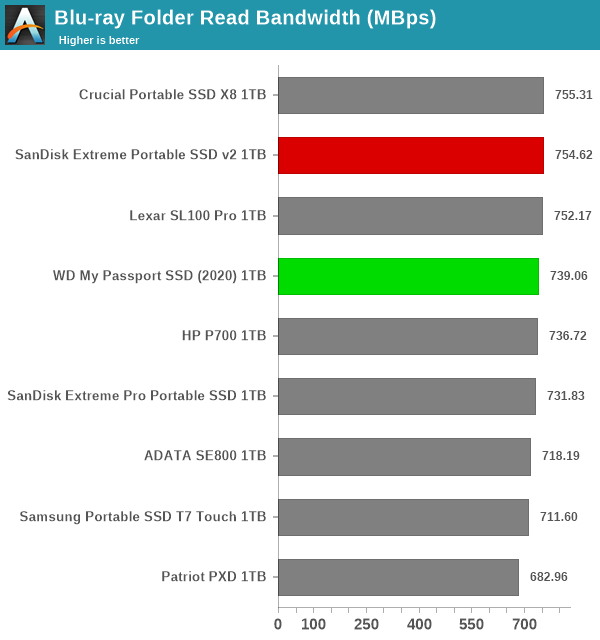
It can be seen that there is no significant gulf in the numbers between the different units. For all practical purposes, the casual user will notice no difference between them in the course of normal usage.However, power users may want to dig deeper to understand the limits of each device. To address this concern, we also instrumented our evaluation scheme for determining performance consistency.
Performance Consistency
Aspects influencing the performance consistency include SLC caching and thermal throttling / firmware caps on access rates to avoid overheating. This is important for power users, as the last thing that they want to see when copying over 100s of GB of data is the transfer rate going down to USB 2.0 speeds.
In addition to tracking the instantaneous read and write speeds of the DAS when processing the AnandTech DAS Suite, the temperature of the drive was also recorded at the beginning and end of the processing. In earlier reviews, we used to track the temperature all through. However, we have observed that SMART read-outs for the temperature in NVMe SSDs using USB 3.2 Gen 2 bridge chips end up negatively affecting the actual transfer rates. To avoid this problem, we have restricted ourselves to recording the temperature at either end of the actual workloads set. The graphs below present the recorded data.
| Performance Consistency and Thermal Characteristics |
| <select ... ><option ... >SanDisk Extreme Portable SSD v2 1TB</option><option ... >WD My Passport SSD (2020) 1TB</option><option ... >ADATA SE800 1TB</option><option ... >Crucial Portable SSD X8 1TB</option><option ... >HP P700 1TB</option><option ... >Lexar SL100 Pro 1TB</option><option ... >Patriot PXD 1TB</option><option ... >Samsung Portable SSD T7 Touch 1TB</option><option ... >SanDisk Extreme Pro Portable SSD 1TB</option><option ... >Expand All</option> </select> |
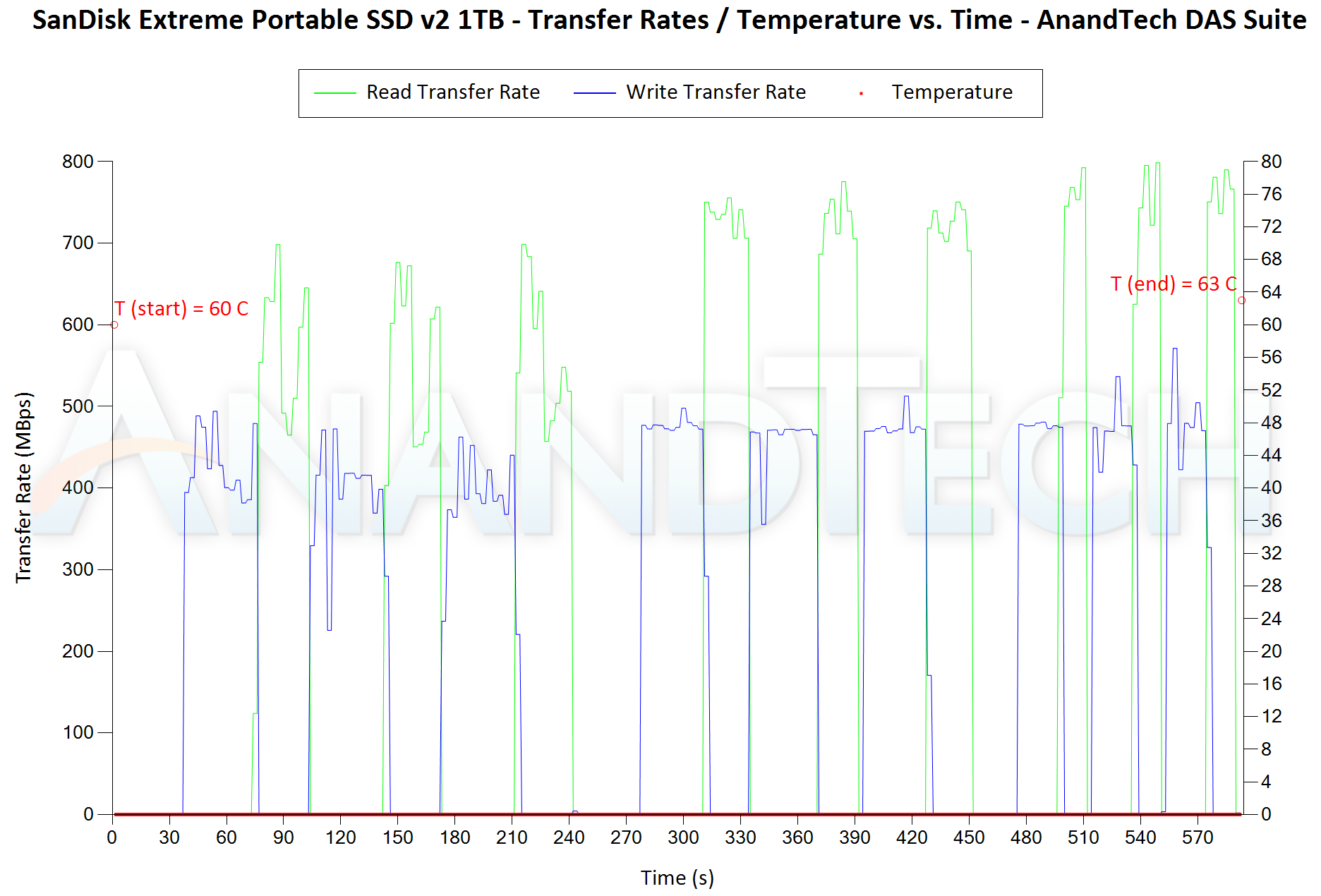 |
The first three sets of writes and reads correspond to the photos suite. A small gap (for the transfer of the video suite from the internal SSD to the RAM drive) is followed by three sets for the video suite. Another small RAM-drive transfer gap is followed by three sets for the Blu-ray folder. An important point to note here is that each of the first three blue and green areas correspond to 15.6 GB of writes and reads respectively. The consistency shown across different passes of the same workload show that no thermal throttling is at play for either SSD. The thermal solution in both perform very similarly for normal workloads - around 3C-4C rise in temperature after around 250GB of reads and writes.
PCMark 10 Storage Bench - Real-World Access Traces
There are a number of storage benchmarks that can subject a device to artificial access traces by varying the mix of reads and writes, the access block sizes, and the queue depth / number of outstanding data requests. We saw results from two popular ones - ATTO, and CrystalDiskMark - in a previous section. More serious benchmarks, however, actually replicate access traces from real-world workloads to determine the suitability of a particular device for a particular workload. Real-world access traces may be used for simulating the behavior of computing activities that are limited by storage performance. Examples include booting an operating system or loading a particular game from the disk.
PCMark 10's storage bench (introduced in v2.1.2153) includes four storage benchmarks that use relevant real-world traces from popular applications and common tasks to fully test the performance of the latest modern drives:
- The Full System Drive Benchmark uses a wide-ranging set of real-world traces from popular applications and common tasks to fully test the performance of the fastest modern drives. It involves a total of 204 GB of write traffic.
- The Quick System Drive Benchmark is a shorter test with a smaller set of less demanding real-world traces. It subjects the device to 23 GB of writes.
- The Data Drive Benchmark is designed to test drives that are used for storing files rather than applications. These typically include NAS drives, USB sticks, memory cards, and other external storage devices. The device is subjected to 15 GB of writes.
- The Drive Performance Consistency Test is a long-running and extremely demanding test with a heavy, continuous load for expert users. In-depth reporting shows how the performance of the drive varies under different conditions. This writes more than 23 TB of data to the drive.
Despite the data drive benchmark appearing most suitable for testing direct-attached storage, we opted to run the full system drive benchmark as part of our evaluation flow. Many of us use portable flash drives as boot drives and storage for Steam games. These types of use-cases are addressed only in the full system drive benchmark.
The Full System Drive Benchmark comprises of 23 different traces. For the purpose of presenting results, we classify them under five different categories:
- Boot: Replay of storage access trace recorded while booting Windows 10
- Creative: Replay of storage access traces recorded during the start up and usage of Adobe applications such as Acrobat, After Effects, Illustrator, Premiere Pro, Lightroom, and Photoshop.
- Office: Replay of storage access traces recorded during the usage of Microsoft Office applications such as Excel and Powerpoint.
- Gaming: Replay of storage access traces recorded during the start up of games such as Battlefield V, Call of Duty Black Ops 4, and Overwatch.
- File Transfers: Replay of storage access traces (Write-Only, Read-Write, and Read-Only) recorded during the transfer of data such as ISOs and photographs.
PCMark 10 also generates an overall score, bandwidth, and average latency number for quick comparison of different drives. The sub-sections in the rest of the page reference the access traces specified in the PCMark 10 Technical Guide.
Booting Windows 10
The read-write bandwidth recorded for each drive in the boo access trace is presented below.
<select ... ><option ... >Windows 10 Boot</option><option ... >Expand All</option> </select>
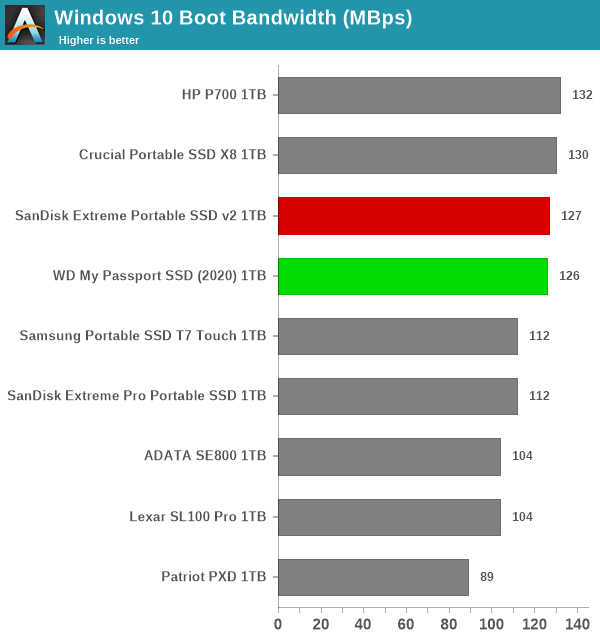
Both SSDs appear in the top half of the chart, and are off from the leader by a small margin.
Creative Workloads
The read-write bandwidth recorded for each drive in the sacr, saft, sill, spre, slig, sps, aft, exc, ill, ind, psh, and psl access traces are presented below.
<select ... ><option ... >Startup - Adobe Acrobat</option><option ... >Startup - Adobe After Effects</option><option ... >Startup - Adobe Illustrator</option><option ... >Startup - Adobe Lightroom</option><option ... >Startup - Adobe Photoshop</option><option ... >Startup - Adobe Premiere Pro</option><option ... >Usage - Adobe After Effects</option><option ... >Usage - Adobe Illustrator</option><option ... >Usage - Adobe InDesign</option><option ... >Usage - Adobe Photoshop Heavy</option><option ... >Usage - Adobe Photoshop Light</option><option ... >Expand All</option> </select>
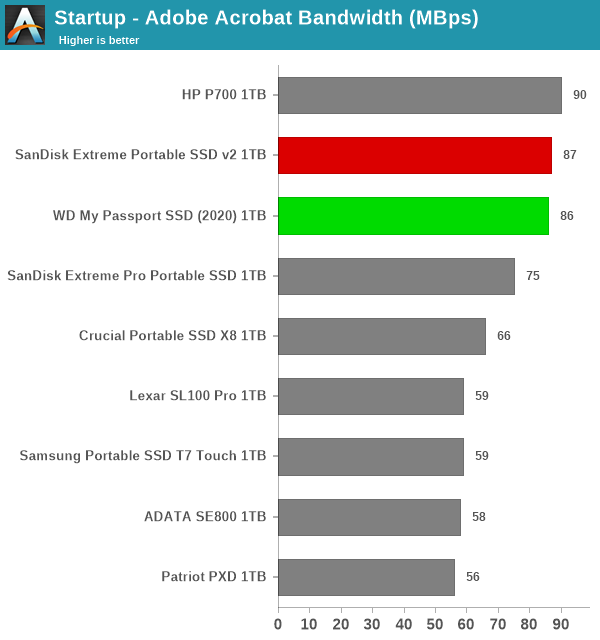
In almost all of the creative workloads, the two SSDs miss out on the top spot by a whisker to the HP Portable SSD P700.
Office Workloads
The read-write bandwidth recorded for each drive in the exc and pow access traces are presented below.
<select ... ><option ... >Usage - Microsoft Excel</option><option ... >Usage - Microsoft Powerpoint</option><option ... >Expand All</option> </select>
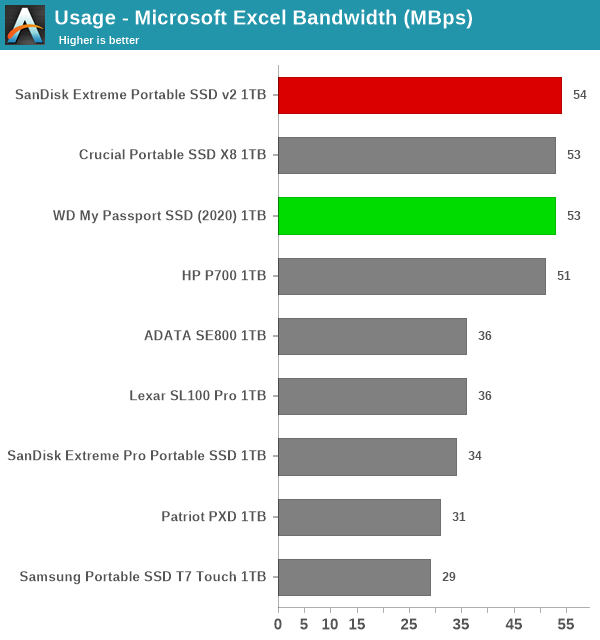
The SSDs come out in the top half again with at least one pole position - however, the HP P700 performs almost as well for the office workloads.
Gaming Workloads
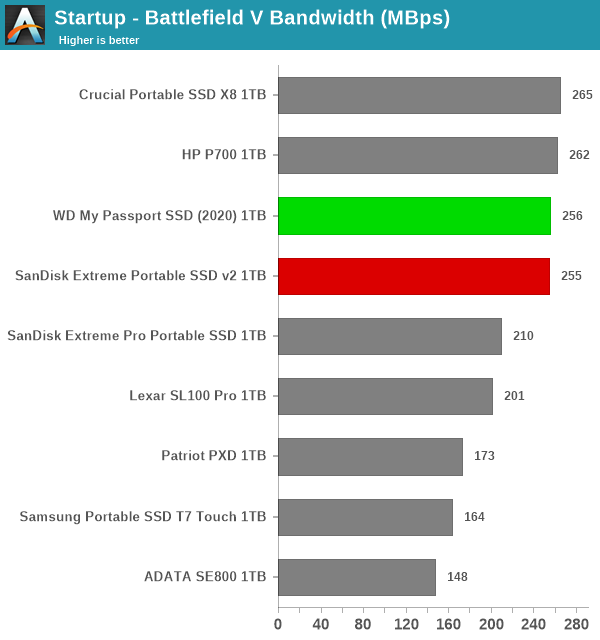
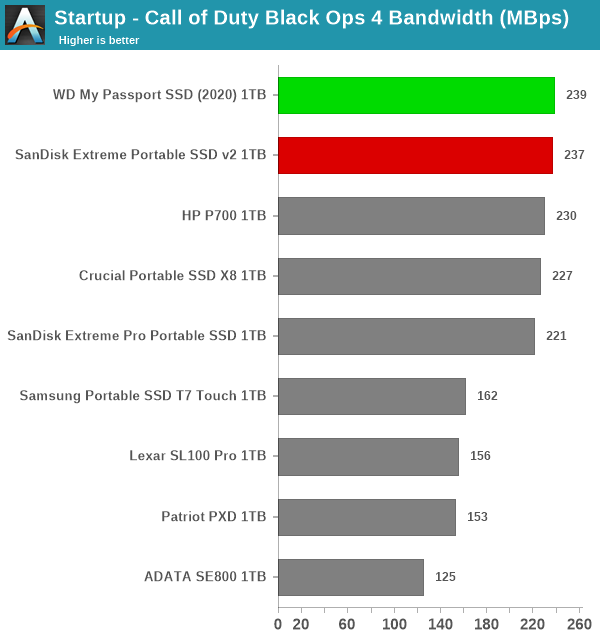
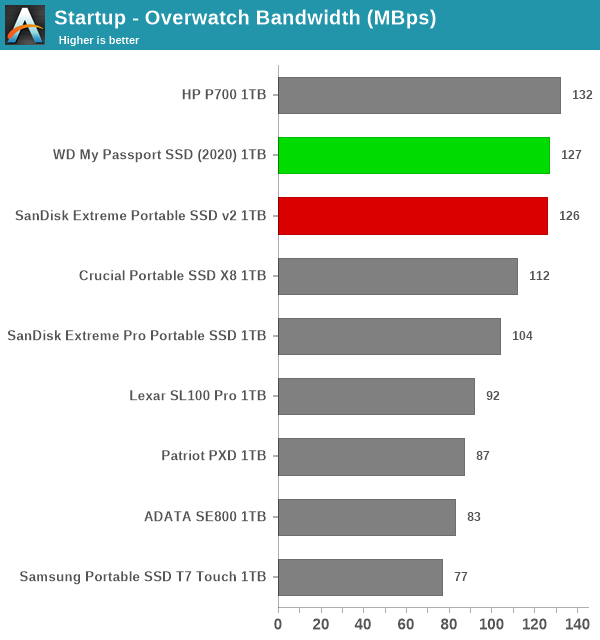
The read-write bandwidth recorded for each drive in the bf, cod, and ow access traces are presented below.
var pcm10_game_0_img_src = new Array(
' ',
'
',
' ',
'
',
' '
);
pcm10_game_0_img_src.push('
'
);
pcm10_game_0_img_src.push('
<a href="https://www.anandtech.com/show/16120/sandisk-extr

