
|
|


Пишет AnandTech (![[info]](http://lj.rossia.org/img/syndicated.gif) syn_anandtech) syn_anandtech)@ 2013-09-25 16:01:00 |
 |
|
 |
|
|
|
|
|
|
 |
|
 |


_575px.jpg)
If I've learned anything in my experiences both reviewing peripherals and discussing them with friends, especially gamers, it's that if keyboards are particular to the individual, mice are even more so. A good friend of mine and I swore by the Logitech G500 for completely different reasons: I liked the texture and freewheel, he liked the adjustable weight.
Today I have on hand two shiny new mice from steelseries and Razer: the Sensei Raw and Ouroboros, respectively. The Sensei Raw is priced on the upper end of gaming mice at $59, while the Ouroboros is a ridiculously high end beast costing a staggering $149.
steelseries Sensei Raw
If I had to peg the steelseries Sensei Raw as anything, I'd label it as a high end Microsoft IntelliMouse. Old school gamers will know what I'm talking about; when optical mice were in their infancy (and Razer elected to continue shipping ball mice until optical sensor technology had improved), the IntelliMouse was a big deal.
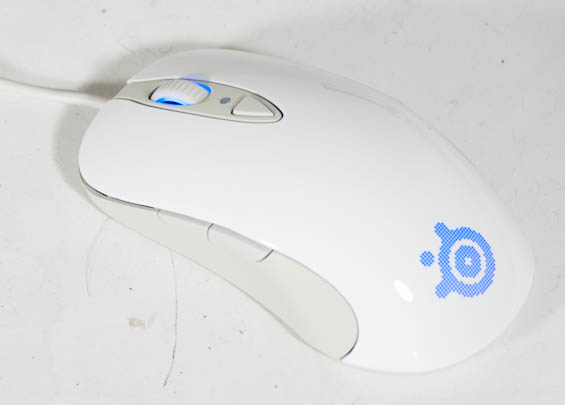
The Sensei Raw is ambidextrous and features two buttons on each side. I'd recommend against the glossy finish model (the one I have in for review), as for me it's an unpleasant texture once my hand starts getting clammy. But sensitivity is anecdotally stellar, the "CPI toggle" basically lets you switch between two user configurable sensitivities, and the illumination is both user configurable and subtle even on its highest setting. The bottom surfaces are smooth, though, and glide very well even on an old, beat up mousepad.
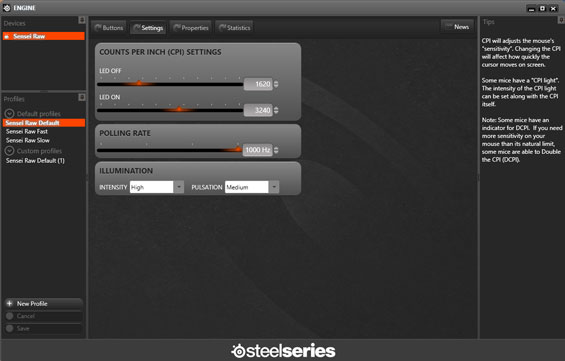
Where I think the Sensei Raw falls apart a little is in the software, which is extremely limited compared to the more robust and polished offerings from Razer and Logitech, and in overall build quality. You do get control of the basics and some fairly robust macro programming, but there's no on-the-fly profile switching. I get the sense that this is the Clevo Notebook of mice: powerful internal electronics in a middling shell.
Overall it's a lighter mouse at just 90 grams, and it's rated at 5700 "counts per inch" and a 1000Hz polling rate, so I get the feeling that for a twitch gamer or someone who needs extra precision, it's probably going to be a good fit. Southpaws who rightfully refuse to adapt are liable to appreciate it. The $59 price tag seems just a little steep, but this is a worthwhile option and definitely a worthy successor to users who miss the IntelliMouse of old.
Razer Ouroboros
Coming in at the complete opposite side of the spectrum is Razer's flagship Ouroboros, a $149 combination wired/wireless mouse similar to Logitech's G700s but with a mountain of extra trimmings.
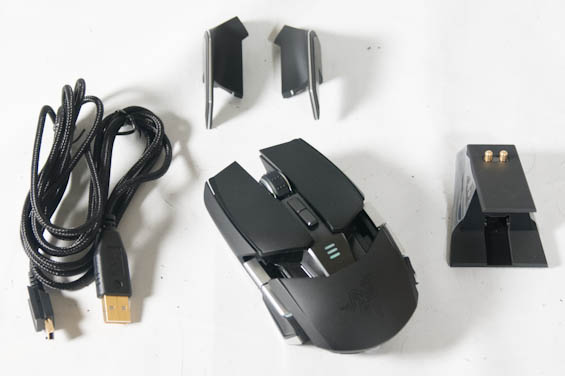
In terms of feel, Razer breaks away from their standard rubberized grip towards what I consider a more breathable matte plastic. This is an ambidextrous design that features two buttons on each side, and the side panels themselves can be removed and replaced with wings if you're the type of mouser who gets irritated with your pinky or thumb brushing your mousing surface. The palm rest can also be both height and length adjusted using a small dial on the bottom of the mouse. Razer claims a maximum sensitivity of 8200dpi with what they call their "4G Sensor," which is a dual laser and optical sensor capable of also reading z-height and "calibrating" to the mousing surface you're using.
Since this is a combination wired/wireless mouse, it's heavier than a corded mouse due to the included battery. I found wireless latency for the most part imperceptible, but interestingly, Razer doesn't allow any wireless power adjustment the way Logitech does on the G700s (useful for conserving battery life). The charging dock is connected by mini-USB and performs double duty as the wireless receiver. I'm perplexed as to why you have to pair the Ouroboros with its receiver, though. Suspecting bluetooth, I tried pairing the mouse directly with my Alienware M17x R3, but no such luck. If Razer is indeed using a form of bluetooth with the Ouroboros, this is most definitely a missed opportunity.
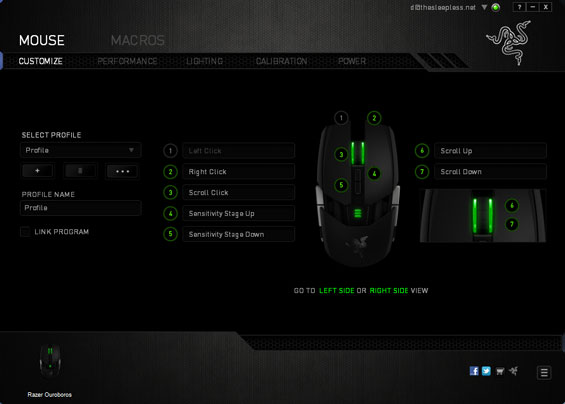
The Razer Synapse 2.0 software offers a tremendous level of configurability in a fairly intuitive interface, allowing you to specify how the mouse sensitivity may be adjusted on the fly, switch profiles, configure backlighting, program macros, and generally program the mouse to function however you like. This software is global across all of Razer's products, which is greatly appreciated; Corsair, steelseries, and Roccat are still using individual drivers for their peripherals, while Logitech has only recently unified everything under their G series driver. Unfortunately, the fly in the ointment continues to be Razer's requirement of an account and log-in for the software. While the cloud support is a useful feature, it should be opt-in and not mandatory.
Yet despite all of these trimmings, I'm incredibly underwhelmed by the Ouroboros. One of the sacrifices made for adjustability is the series of broken surfaces along the top and sides, and these surfaces have edges that are uncomfortable to the sides of my fingers. And for all the adjustability, I just can't get it particularly comfortable in my hand. It's nowhere near the disaster Thermaltake's Level 10 M is, but it's definitely a major step down from the Logitech G700s I use as my daily. This is an issue of personal preference, though, and other users may find it vastly superior.
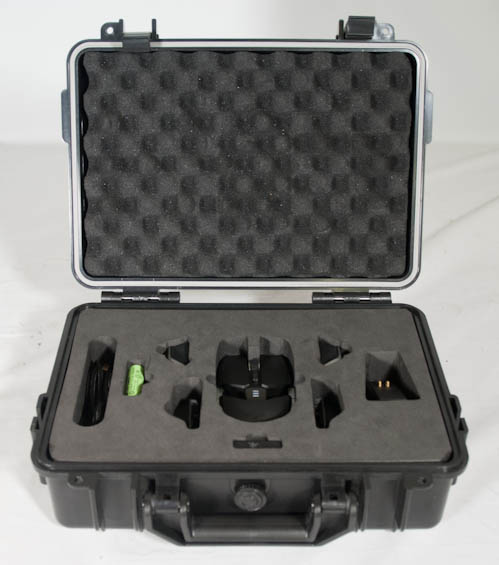
The press kit is impressive to say the least.
What I find most troublesome are the middling glide surfaces on the bottom of the mouse (which were clearly designed for high end mousepads and little else) and the fact that there are no basic hardware switches/buttons for pairing or powering the mouse on or off. To pair it, you have to squeeze the four side buttons at the same time until it goes into pairing mode. To power it on or off, you have to simultaneously hold down the two buttons under the mouse wheel. This is more trouble than it needs to be, it's not convenient, and these buttons have functions. When my G700s needs to travel, I flip it over and switch it off. I don't hold the sensitivity buttons, hope I don't accidentally tweak the sensitivity on the fly, and then wait three seconds for it to power off.
_thumb.jpg)
_thumb.jpg)
_thumb.jpg)
_thumb.jpg)
_thumb.jpg)
_thumb.jpg)
And that's kind of where I'm at with it. Recognizing that these are very personal devices, I still feel like at $149 I shouldn't be able to nitpick anything. But Razer's Synapse 2.0 software, despite the functionality being excellent, still frustrates me with its mandatory online account; meanwhile my G700s has had all of its functionality programmed and stored on the mouse's on board memory, so I don't even have to install the G series software ever again; cloud be damned, all of my settings just go where the mouse goes. The adjustable grip is nice, but you're still going to have to determine whether or not the feel is right for you, and either way there's no reason Razer couldn't have a smoother glide on the Ouroboros.
With all that in mind, though, there are undoubtedly going to be users that will absolutely adore the Ouroboros. It's not the ultimate wireless gaming mouse, but it's a very strong contender. I just have a hard time recommending it when Logitech's already high end G700s can be found for at least $60 cheaper, and when at the end of the day, I'd personally rather use the G700s.

     |


